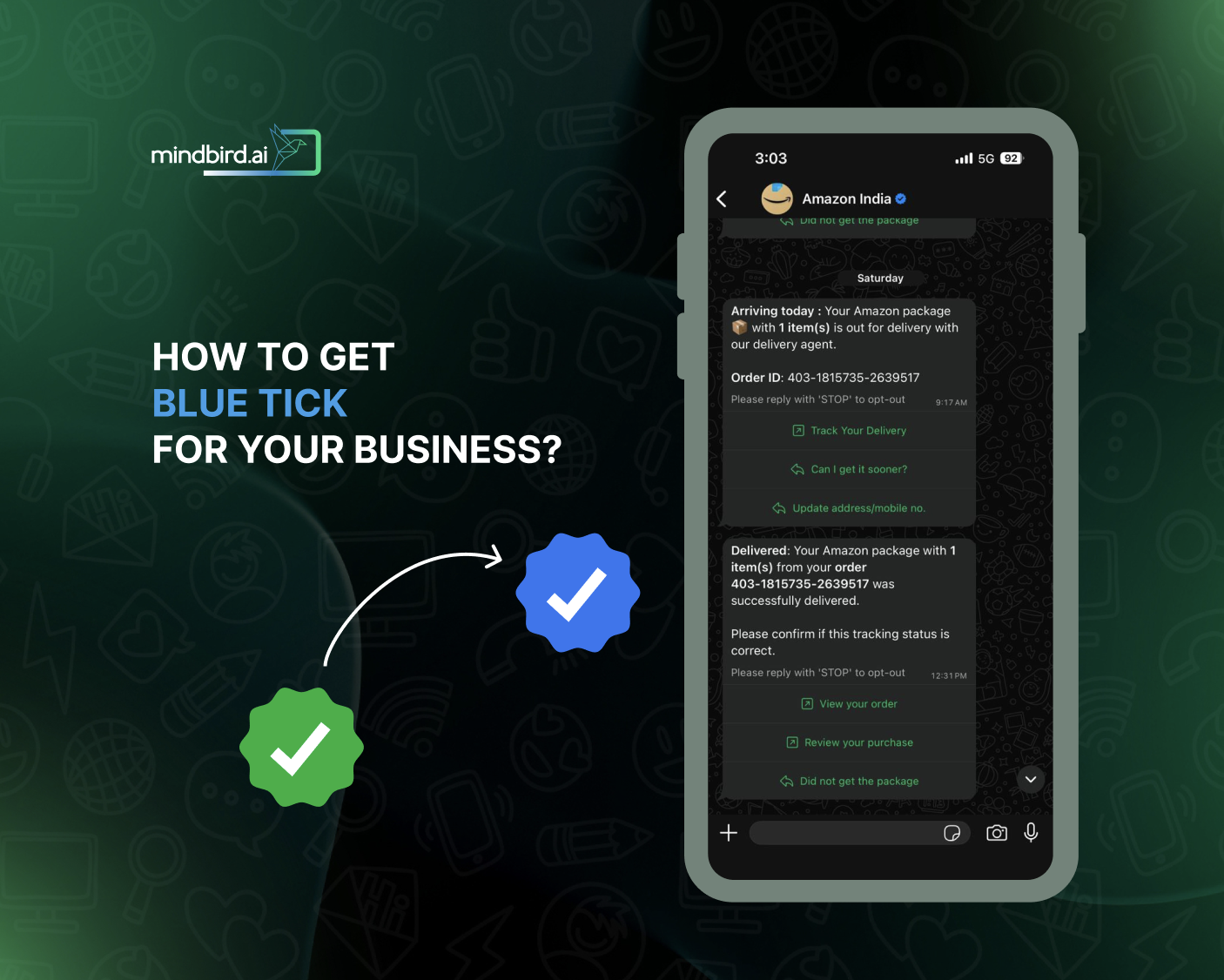
Users look for trust signals to distinguish genuine brands among the noise. The WhatsApp Green Tick serves as a symbol of trust for brands that want to build a stable customer base. The Green Tick which has largely now transitioned to being the BLUE tick (also known as the Official Business Account (OBA) badge) is more than a vanity metric—it is what sets the stage for users to accept and start communications with any brand.
Metrics show that 98% of WhatsApp messages are opened, but conversations happen only when a user invests trust in your brand. Trust doesn’t come from flashy deals or beautiful images or crafty words—showing that your brand is a genuine business with offerings that are not spam is the first step.
In this article, you will learn how to get the verified blue tick for your business without any hassle.
Also read: How to Set Up WhatsApp Business API?
Why ‘Green’ Tick became Blue?
In 2024 and 2025, Meta began a significant transition to unify its branding across Facebook, Instagram, and WhatsApp. The iconic Green Tick is officially being retired in favor of the Blue Tick (the Meta Verified badge).
This shift isn’t just about color; it’s about creating a universal ecosystem of trust. If you are looking to verify your business in 2026, you need to understand this new “Blue” landscape. The “Green Tick” was once the exclusive symbol of WhatsApp authority. However, to align with the rest of the Meta family, WhatsApp has transitioned to the Meta Blue Badge. This change helps users instantly recognize verified entities across WhatsApp, Instagram, and Facebook.
In 2026, this blue badge is your digital passport. It tells your customers that your business has been vetted by Meta, reducing friction and significantly boosting engagement rates.
How to Get the Verified Blue Tick?
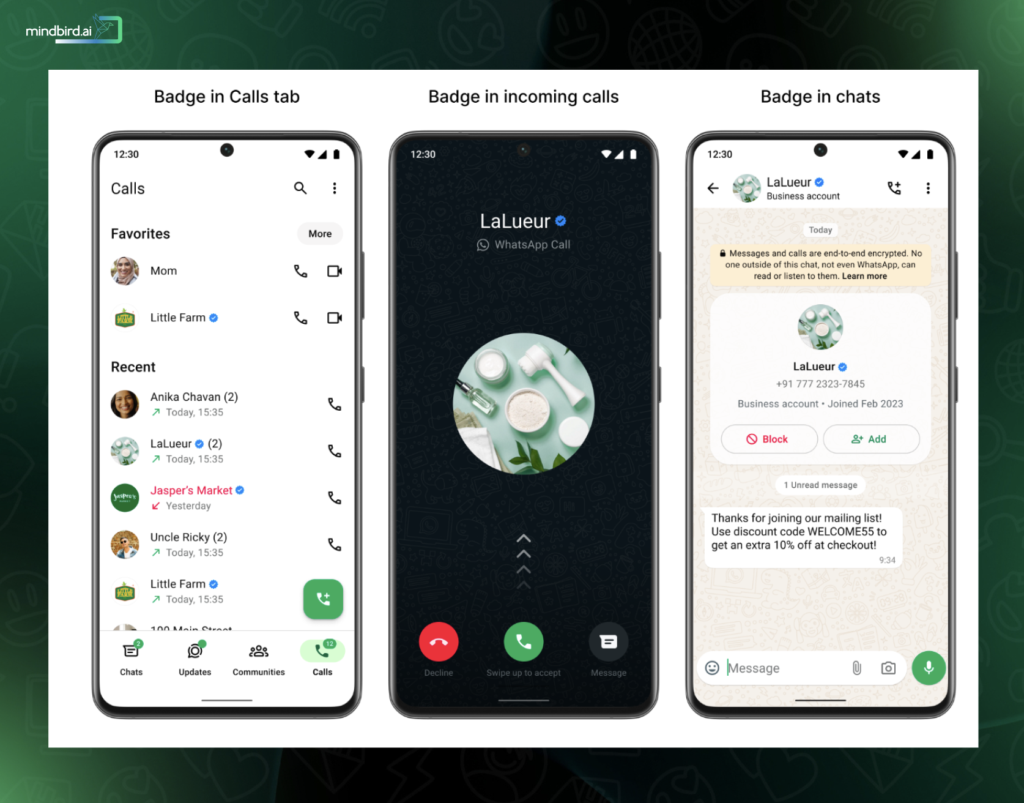
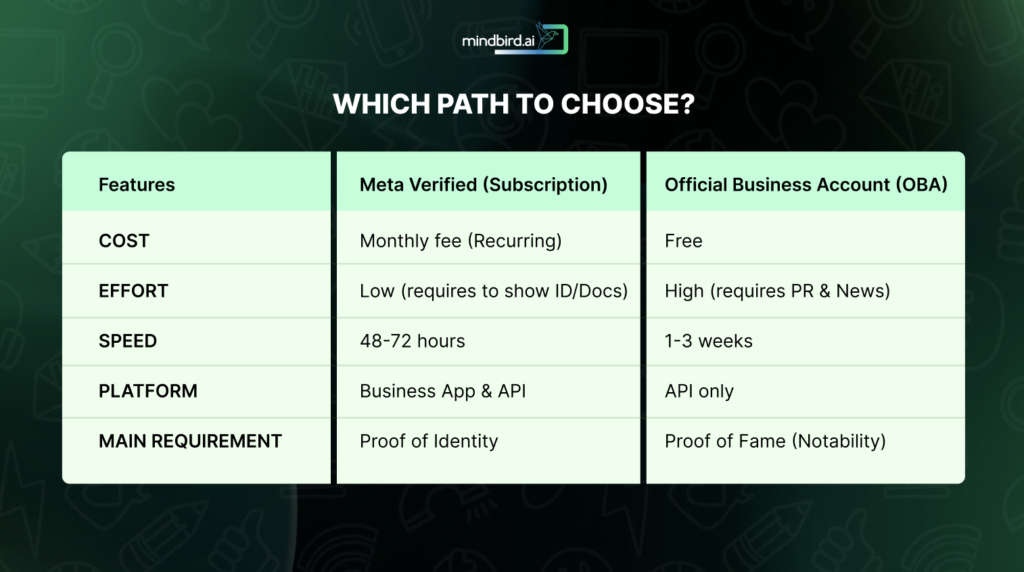
In 2026, Meta simplified the process for getting the blue badge (verification) on WhatsApp. However, now there are two distinct paths to acquire it for your business. You get it either as a subscription model (for anyone legitimate) or an honorary award (for the world’s biggest names).
If you are a beginner, here is the breakdown of how these two paths work and which one you should choose.
Path 1: Meta Verified (The “Fast Track” Subscription)
This is a relatively new path (introduced/expanded in 2025-2026) designed for growing businesses. If you have a legitimate business and are willing to pay a monthly fee, you can get the blue tick almost instantly.
- How it works: You pay a monthly subscription fee to Meta. In exchange, Meta verifies your business identity and gives you the blue badge.
- Who is it for: Small to medium businesses, local brands, and startups that want trust immediately without needing to be “famous.”
- How to get it:
- Open your WhatsApp Business App or Meta Business Suite.
- Look for the “Meta Verified” tab in your settings.
- Choose a plan (pricing varies by region, usually around $14–$30/month).
- Submit your ID or business documents (like a tax registration or utility bill).
- Once approved (usually in 2–3 days), the blue tick appears.
- Bonus Features: Usually includes “Impersonation Protection” (Meta monitors for people faking your brand) and “Enhanced Support” (you get to talk to real humans at Meta if you have issues).
Path 2: Official Business Account (The “Notable” Badge)
This is the “classic” verification. It is free (no monthly subscription), but it is much harder to get. Meta only gives this to brands that are “notable.”
- How it works: You don’t pay for this badge; you earn it by proving your brand is a household name.
- Who is it for: Global corporations (like Coca-Cola or Netflix), major government agencies, and massive influencers.
- How to get it:
- You must be using the WhatsApp API (not the regular app).
- You must verify your Meta Business Manager account first.
- You submit an application with 5 links to news articles about your brand.
- Meta’s team manually reviews your “notability.” If they decide you are famous enough, they grant the badge for free.
- The Difficulty: Most applications are rejected here because the news articles provided are “paid PR” or from small blogs. Meta requires “earned media” (major news outlets talking about you voluntarily).
Note:
If you are just starting out, start with Meta Verified. The Green-to-Blue transition means that customers now recognize the Blue Tick as the standard of trust across Instagram, Facebook, and WhatsApp. For most businesses, paying the subscription is far cheaper and faster than hiring a PR agency to get enough news coverage to qualify for the “Official Business Account” status.
Why Subscription Model Work for New Businesses?
The ‘blue’ badge may look similar for every business, whether you are a famous global brand or a new business that have paid a subscription fee. The challenge is that getting it remains strictly guarded by Meta’s “Notability” filters. If you are applying for the Official Business Account (OBA) status (the “earned” free badge), understanding why Meta says “no” is the first step toward eventually getting a “yes.”
Reasons why Meta will Reject your OBA Request:
Most businesses fail the verification process not because their paperwork is wrong, but because they haven’t cleared the high bar of being a “notable” brand. Meta’s goal is to ensure that only brands with significant public interest receive the OBA status.
There are two pressing factors and/or analysis that happens when you place an OBA request.
1. Lack of “Earned” Media Coverage
When you apply for the blue badge, Meta asks for up to five links to show that your business is a public figure or a household name. This is where most brands stumble.
- The “Organic” Requirement: Meta looks for 3–5 news articles from major, reputable publications (e.g., The Financial Times, BBC, or TechCrunch). These must be “earned,” meaning the news outlet wrote about you because your business did something noteworthy.
- The Rejection Trigger: If your links consist only of sponsored content, paid PR, or press releases that you distributed yourself, Meta’s AI will flag them. In 2026, their verification algorithms are highly sophisticated at detecting “Pay-to-Play” articles. If the page contains a disclaimer like “Paid Advertisement” or “Promoted Content,” it effectively counts as zero toward your verification.
2. The “Search Intent” Hurdle
Meta doesn’t just look at what reporters say; they look at what the general public is doing. They use internal data and global search trends to measure “Search Volume.”
- What Meta Looks For: If people are actively typing your brand name into search engines or the WhatsApp directory, it signals that you are a notable entity.
- The Rejection Trigger: If your brand has no “organic search intent” (as in the only time people find you is through your own paid Facebook or Google ads), Meta may deem you “not notable.” Essentially, if the public isn’t curious enough to look for you voluntarily, Meta sees no reason to give you a “notable” badge.
If your business is a legitimate, growing company but hasn’t yet reached “global fame” or hit the front pages of major news outlets, you can simply opt for the subscription model.
The Meta Verified for Business subscription is now the standard solution for most modern brands, whether new or not. Here’s why:
- ID-Based: Unlike the OBA status (which relies on fame), Meta Verified relies on authentication. You provide your business license, tax documents, and a government ID. Once Meta confirms you are who you say you are, you get the blue tick.
- Monthly Subscription Model: This path involves a monthly fee. In exchange, you get the blue badge, which looks identical to the “notable” one, providing instant trust to your customers.
- Rigorous Protection: Beyond the badge, the subscription includes impersonation protection. Meta uses proactive monitoring to ensure no one else can use your brand name or logo to scam customers on WhatsApp.
- Direct Support: One of the biggest perks of this path in 2026 is access to human support. If you have a technical issue with your WhatsApp API, subscribers move to the front of the line.
How mindbird Can Speed Up the Meta Verification Process?
mindbird act as a central hub in unifying your brand verification across entire Meta platform without you having to lift a finger. Be it name mismatch error or handling business documents for verification processes, mindbird handles it seamlessly while you get the best of it – the blue tick for your business.
Here’s how mindbird is simplifying the process for SMBs –
- Automatically audit your Meta Business Suite profile to ensure your name, logo, and category match your WhatsApp API settings before you pay for the subscription.
- Provide a pre-application checklist and a “document health check.” You can simply upload your documents to mindbird first, where we verify they meet Meta’s 2026 (and beyond) standards.
- Instead of guessing why Meta rejected a document, you get an “All Clear” from mindbird, ensuring the subscription is approved on the first attempt.
- Since mindbird is a Meta Partner, you can get the Meta Verified fee integrated directly into their billing, providing a single invoice for the API usage and the Blue Badge. It simplifies business accounting and ensures the badge doesn’t “drop off” because a credit card expired on a separate Meta billing page.
- If Meta detects someone trying to spoof your brand, mindbird will instantly send an “Security Alert” to the business owner. It turns a passive badge into an active security tool, protecting the business’s reputation without you needing to manually search for imposters.
- Many businesses start with the subscription but eventually grow “notable” enough for the free. When your brand reaches the threshold of fame, mindbird will nudge you – “You are now notable enough to cancel your subscription and apply for a permanent, free official blue tick.”
Mindbird helps you avoid the “Rejection Loop.” We guide you to the subscription model if you need speed and immediate trust. When the time comes, we assist in preparing you for the “Official” model. In a nutshell, mindbird is designed to scale with your business at every juncture.
Try mindird for free or book a demo now.