When a large tech name like Meta isn’t happy about allowing rival AI chatbots to access WhatsApp, you know how core AI chatbots are to WhatsApp messaging, especially for businesses. WhatsApp is one of the largest messaging platforms that has evolved from being just a personal conversation space with people we know. It is now also home to businesses that want to engage end users without feeling pushy or noisy.
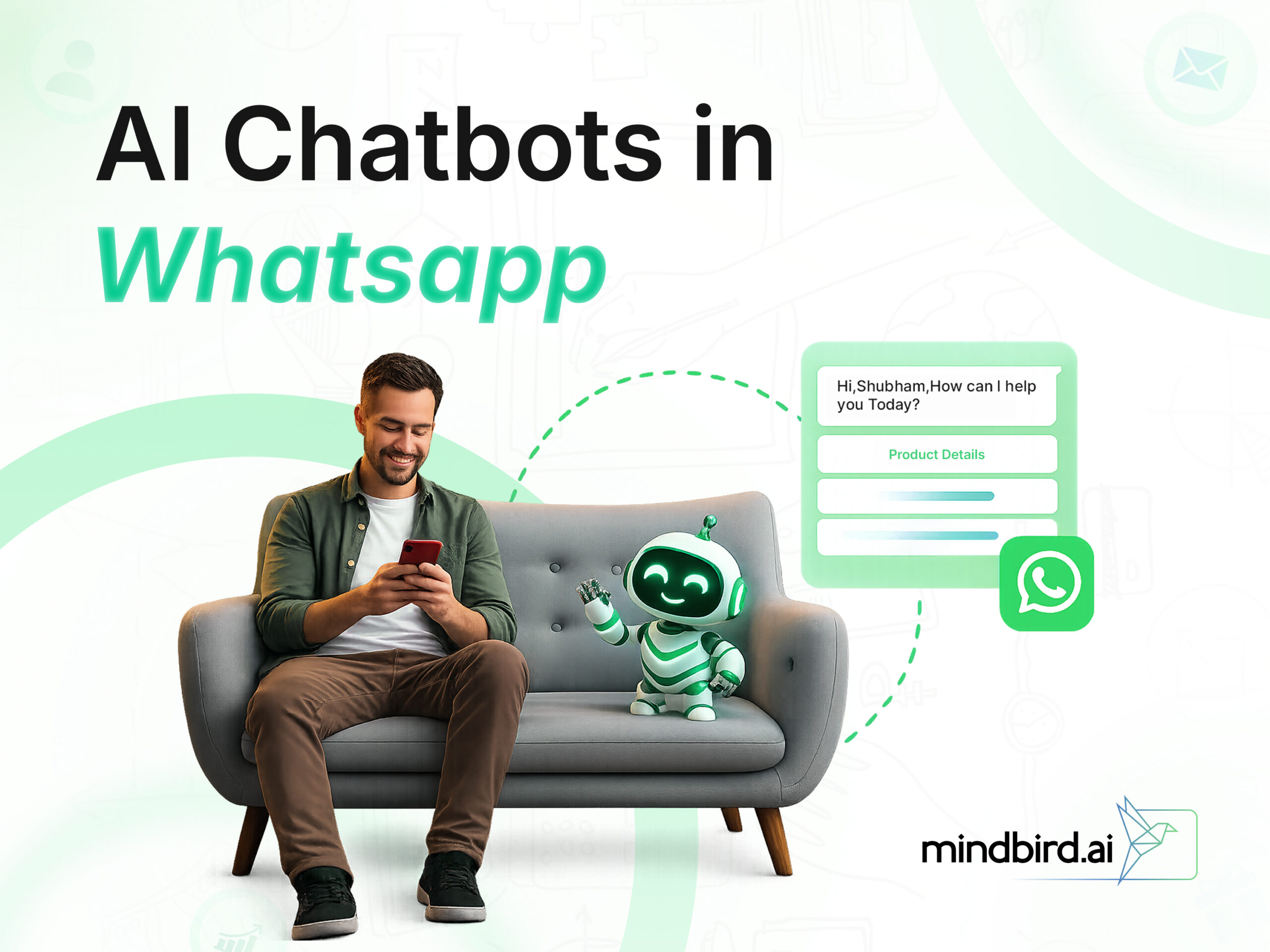
With over 3 billion active users, WhatsApp has grown into a space where your customers message their friends, family, and businesses they trust. So why make them download another app, visit another website, or sit in another email queue? An AI chatbot inside WhatsApp can do the preliminary talking with a potential (and existing) user.
A WhatsApp AI chatbot puts your business exactly where conversations already happen. It answers questions at 2 AM. It recovers abandoned carts. It qualifies leads before your sales team even wakes up. Now, that’s how smart businesses are getting leads converted!
In this article, we will discuss why WhatsApp chatbots matter, how to build one from scratch, which platforms to use, and real brand examples that prove the ROI. Let’s start.
How WhatsApp Chatbots Are Reshaping Businesses?
Once upon a time, customers would have to wait for the brands to respond or scroll through knowledge bases and FAQs to find answers to their queries. Now, it is about instant response. Customers hate to wait! Even if it is a bot responding, customers know their queries have been noted. Incase the bot is unable to resolve the issue, it is instantly queued up for a human to intervene. Whatever time it is, day or night, a brand has to respond instantly, or else they will lose customer interest in a snap.
WhatsApp chatbots have rewritten the rules for how brands sell, support, and engage. And the results speak for themselves. Here’s how WhatsApp AI chatbots are reshaping customer-brand interactions.
1. Customer Support That Never Sleeps
Traditional support channels force customers into queues. WhatsApp chatbots flip that model entirely. They respond in seconds, handle multiple conversations at once, and stay online 24/7.
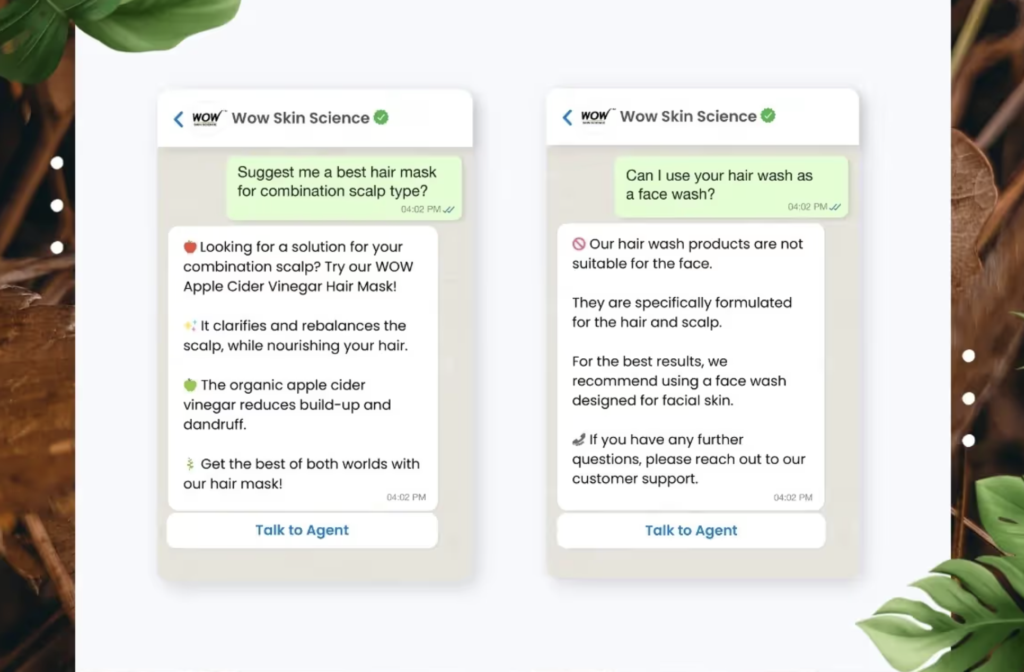
Indian beauty brand WOW Skin Science saw this firsthand. The company struggled to manage high query volumes during peak hours. After deploying a WhatsApp chatbot integrated with GPT through LimeChat, they automated 50% of customer queries. A click-based bot handles order tracking and returns, while complex questions about product usage and skincare recommendations flow through AI-powered free-text conversations. Resolution times dropped below one minute.
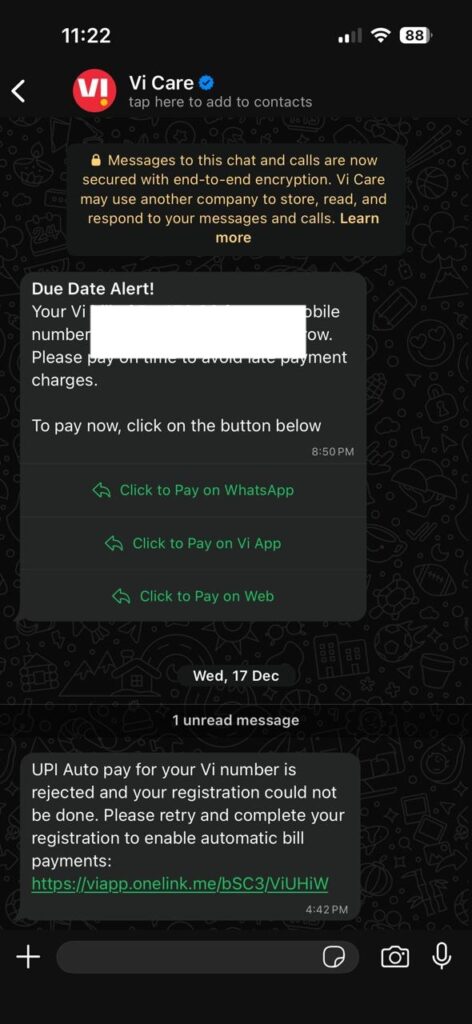
Vodafone took a similar approach. The telecom giant deployed a WhatsApp AI assistant to handle common support queries, plan upgrades, and account inquiries. The result was a significant reduction in call center volume and improved customer satisfaction scores.
2. Sales and Lead Generation on Autopilot
WhatsApp chatbots don’t just answer questions. They sell. With open rates above 95% and response rates that crush email, WhatsApp has become a direct revenue channel for brands willing to invest in automation.
Flipkart, India’s largest e-commerce platform, demonstrated this during its massive “Big Billion Days” sale. The company launched an automated WhatsApp chatbot featuring a virtual persona of Bollywood star Amitabh Bachchan. The bot offered puzzles, emoji-based games, product recommendations, and personalized shopping assistance. It turned a promotional campaign into an interactive experience that drove engagement and conversions at a scale traditional ads simply couldn’t match.
This WhatsApp bot called BigB by @flipkart has my attention. Showcasing their Big Billion Days offers by using emojis and interacting with whatsApp is really innovative. Don't think I've seen a similar use of the platform till now – https://t.co/92j7Da4J1N pic.twitter.com/KPERnFintt
— Amit Panchal (@AmitHPanchal) October 3, 2019
Have you checked out @Flipkart’s WhatsApp innovation – BigB by Flipkart?
— Akash Jain (@akash207) October 3, 2019
WhatsApp in never seen avatar as before. Quiz, offers via Emoji and more.
Drop a Hi here to talk : https://t.co/KMG07z3Wkn pic.twitter.com/e55aQVzQUd
3. Bridging Offline and Online Marketing
Most offline campaigns (billboards, flyers, in-store signage) have one big problem: you can’t track what happens after someone sees them. A WhatsApp chatbot fixes that. Place a WhatsApp number or QR code on any physical asset, and every scan or message becomes a trackable conversation. You turn passive impressions into active, measurable engagements.
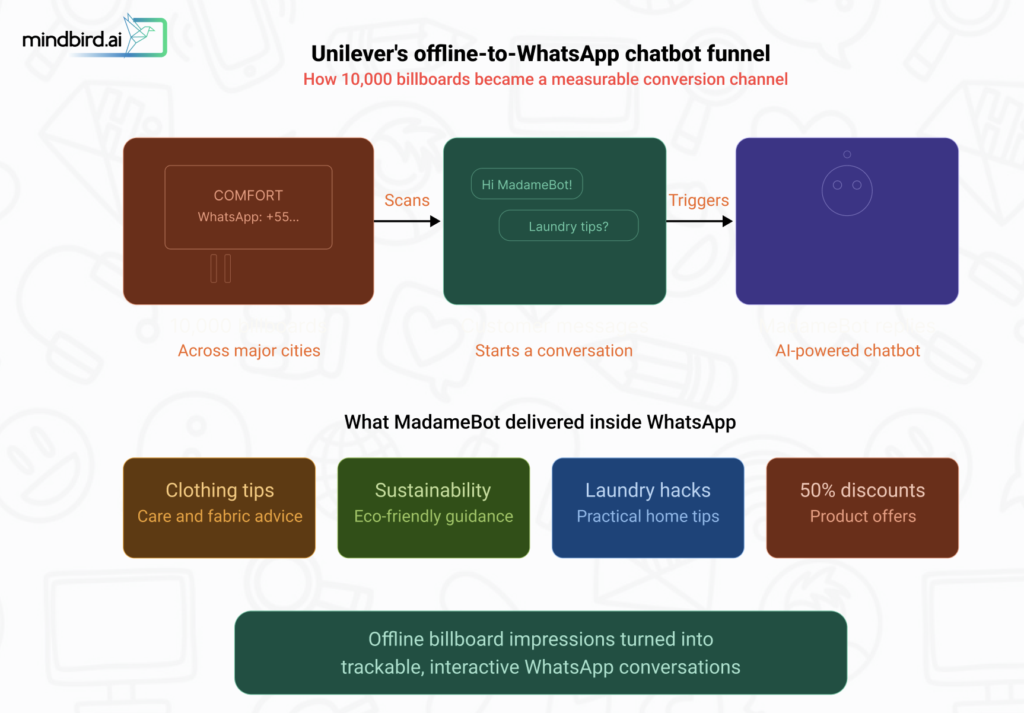
One of the most creative WhatsApp chatbot deployments came from Unilever in Brazil. When launching its “Comfort” fabric softener brand, Unilever placed over 10,000 billboards with WhatsApp numbers across major cities. The “MadameBot” chatbot provided clothing care tips, sustainability advice, and laundry hacks, along with 50% discount offers. By connecting physical advertising directly to a conversational chatbot, Unilever created a measurable, interactive marketing channel from outdoor billboards.
4. Recovering Lost Revenue
Cart abandonment plagues every e-commerce business. WhatsApp chatbots tackle this head-on. They detect abandoned carts and send personalized reminders with product images, direct checkout links, and optional discount codes.
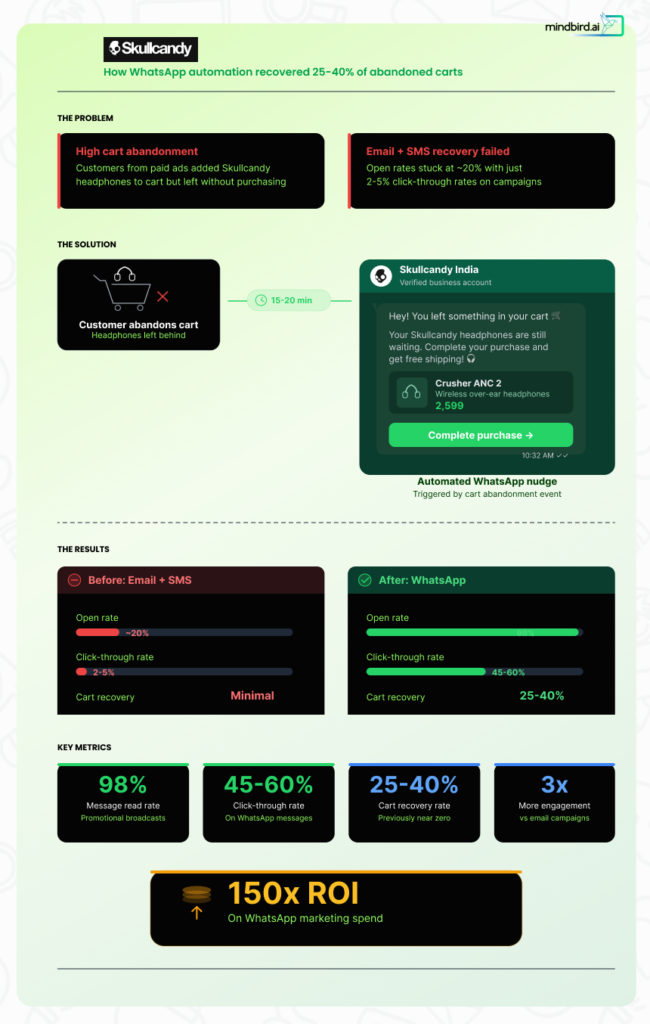
Skullcandy India faced exactly this problem. Customers clicked through paid ads, landed on the website, added headphones to their cart, and then disappeared. Email and SMS recovery campaigns barely made a dent, with open rates hovering around 20%. Skullcandy, then, switched to WhatsApp automation, triggering abandoned cart notifications 15 to 20 minutes after a customer left without purchasing. The results were dramatic: they recovered 25 to 40% of abandoned carts and achieved a 150x ROI on their WhatsApp marketing spend. Promotional broadcasts hit 98% read rates with 45 to 60% click-through rates, numbers that email could never touch.
These use cases aren’t isolated success stories. Over 175 million people message a business account on WhatsApp every single day. And WhatsApp’s own case studies indicate that 66% of customers make a purchase after interacting with a brand on the platform.
The pattern is clear: businesses that meet customers inside WhatsApp sell more, support faster, and build stronger relationships. But there are limitations as well.
WhatsApp Chatbot Limitations
WhatsApp chatbots are powerful, but they come with real constraints. Understanding these upfront will save you from costly mistakes down the road.
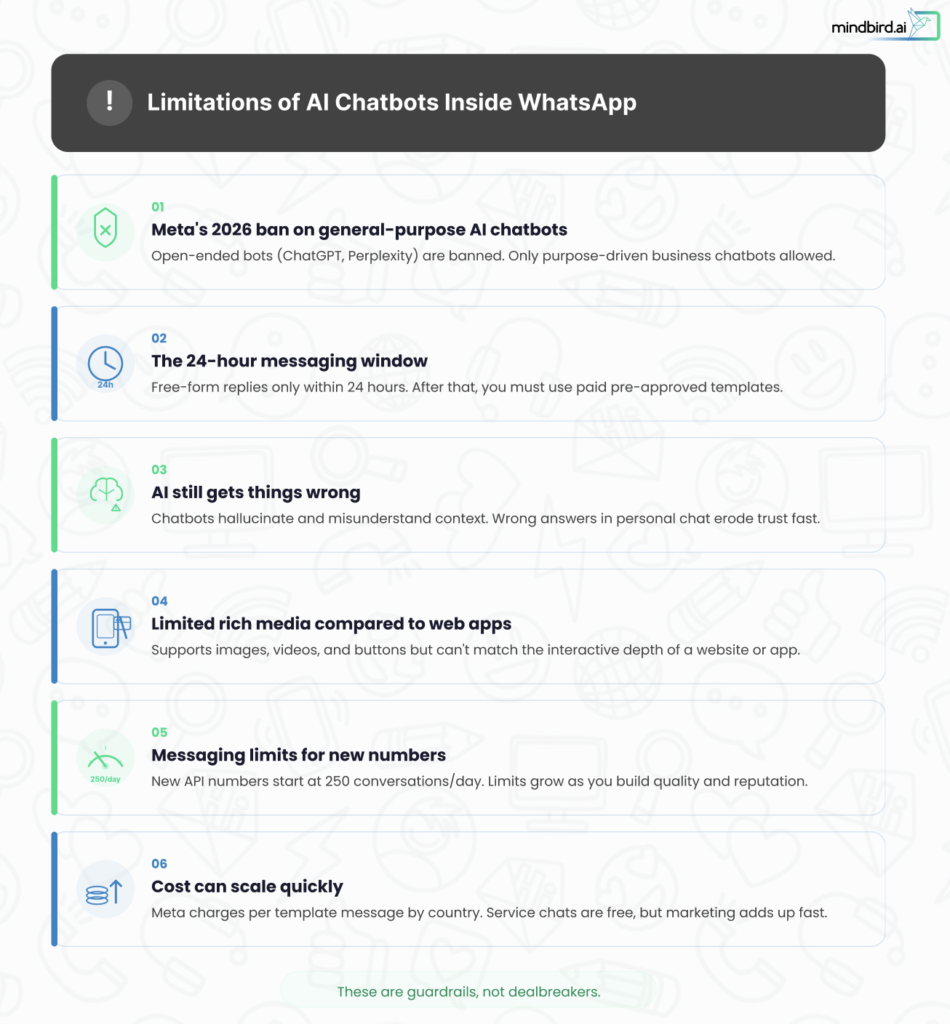
1) Meta’s 2026 Ban on General-Purpose AI Chatbots
This is the biggest policy shift to hit WhatsApp in years. Starting January 15, 2026, Meta banned general-purpose AI chatbots from the WhatsApp Business API. Companies like OpenAI (ChatGPT) and Perplexity, which had launched standalone AI assistants on WhatsApp, were forced off the platform.
The policy is specific: AI providers cannot use the WhatsApp Business API to distribute open-ended, “ask-me-anything”-style chatbots where the AI itself is the primary product.
What’s still allowed? Business-focused chatbots where AI plays a supporting role.
If your chatbot handles customer support, lead qualification, order tracking, appointment booking, or product recommendations for your specific business, you are fully compliant. The AI must serve your business function, not act as a general-purpose assistant.
This distinction matters. A travel company running a booking bot? Compliant. A skincare brand answering product questions with AI? Compliant. A wrapper around ChatGPT that lets users ask anything? Banned.
The EU has opened an antitrust investigation into whether this policy unfairly favors Meta’s own AI assistant, and regulators in Brazil and Italy have pushed back with temporary injunctions. The legal landscape is evolving, but the current rules are clear: build purpose-driven, business-specific chatbots.
2) The 24-Hour Messaging Window
WhatsApp enforces strict rules about when businesses can message customers. When a customer messages you, a 24-hour “service window” opens. During this window, you can send free-form messages. Once the window closes, you can only reach out using pre-approved message templates, which cost money per message.
This means your chatbot cannot initiate open-ended conversations whenever it wants. You need to plan your automation flows around this constraint and use templates strategically for follow-ups, reminders, and re-engagement.
3) AI Still Gets Things Wrong
Even the best AI chatbots hallucinate, misunderstand context, or give incorrect answers. WhatsApp conversations feel personal and immediate, so a wrong answer from a chatbot carries more weight than a bad search result on a website. Customers expect accuracy in a chat format.
You must build guardrails: fact-check your AI’s knowledge base, set confidence thresholds for responses, and design clear human escalation paths for questions the bot can’t handle reliably.
4) Limited Rich Media Compared to Web Apps
While WhatsApp supports images, videos, documents, buttons, and product catalogs, it is still a messaging app. You cannot embed complex interactive elements like you would on a website. WhatsApp Flows help bridge this gap with in-chat forms and surveys, but the UX will always be simpler than a full web or mobile app experience.
5) No Persistent User Sessions
WhatsApp doesn’t maintain long-running sessions the way web applications do. If a customer comes back a day later, your chatbot needs to reconstruct context from stored data or CRM records. Without proper integration, the experience feels fragmented, and customers hate repeating themselves.
6) Messaging Limits for New Numbers
New WhatsApp Business API numbers start with low messaging limits (typically 250 business-initiated conversations per 24 hours). These limits increase gradually as you demonstrate quality (low block rates, high engagement). Until you build up your reputation, you cannot blast large campaigns to your full customer list.
7) Cost Can Scale Quickly
Meta charges per delivered template message, and rates vary significantly by country. While service conversations are free, outbound marketing at scale can get expensive fast, especially in markets like North America and Western Europe.
The interesting fact is none of these limitations are actually deal breakers. Rather, these act as guardrails.Businesses that understand them upfront build smarter chatbots, stay compliant, and avoid costly surprises after launch. With the right technical foundation and platform choice, every constraint listed above becomes manageable.
That brings us to what you actually need before you start building.
Technical Requirements to Build AI Chatbots Inside WhatsApp
Before you start building, make sure you have the technical foundations in place. Here’s what you need.
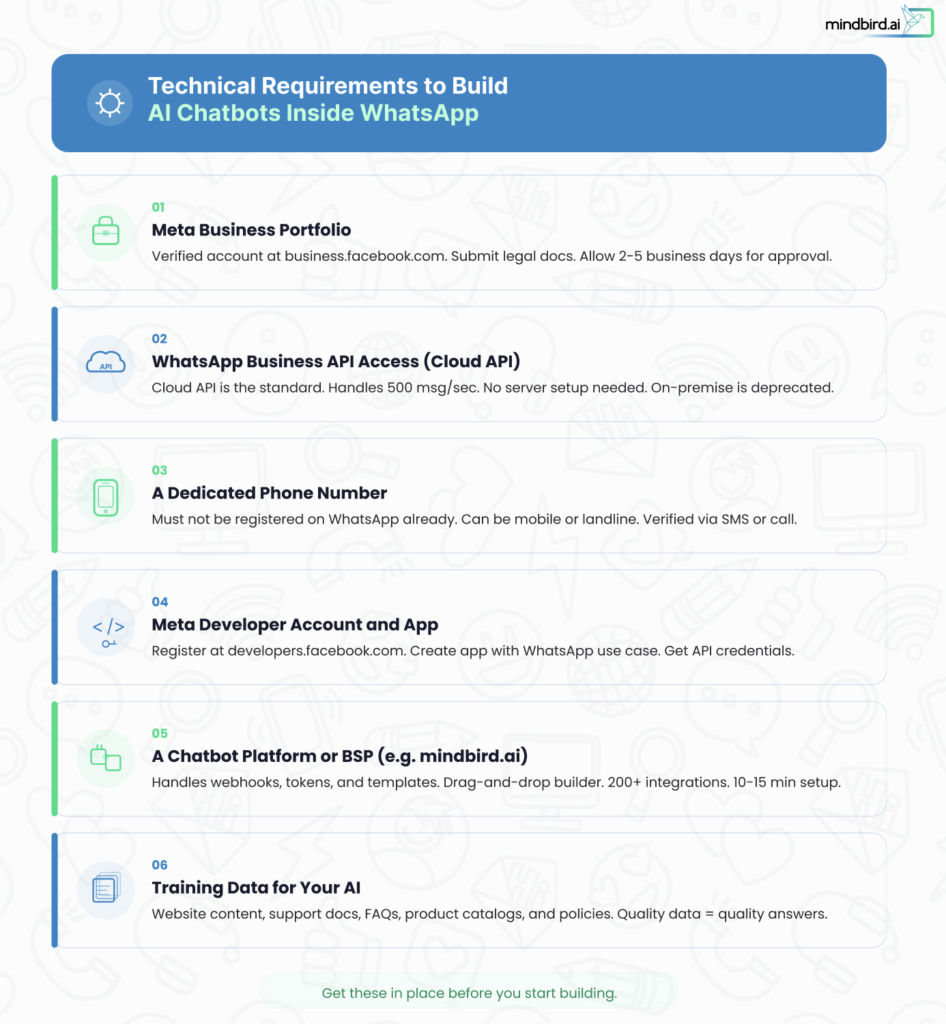
1. Meta Business Portfolio (Formerly Facebook Business Manager)
Every WhatsApp Business API integration starts here. You need a verified Meta Business Portfolio at business.facebook.com. This involves submitting your business name, address, legal documents, and contact details. Meta uses this to verify your business identity and unlock full messaging capabilities.
Start this early. Verification takes 2 to 5 business days on average but can stretch to two weeks.
2. WhatsApp Business API Access (Cloud API)
The WhatsApp Business App (the free app for small businesses) does not support chatbot integrations. You need the WhatsApp Business API, specifically the Cloud API, which Meta now treats as the standard. The on-premises API is effectively deprecated for new use cases.
The Cloud API runs entirely on Meta’s servers. It handles up to 500 messages per second. No server setup, no security updates, no DevOps overhead on your end.
3. A Dedicated Phone Number
You need a phone number not already registered on WhatsApp. It can be a mobile or landline number, but it must receive SMS or voice calls for verification. Once connected to the API, this number cannot be used in the regular WhatsApp app anymore.
4. Meta Developer Account and App
Register at developers.facebook.com, create an app, and select the “Connect with customers through WhatsApp” use case. This links the WhatsApp product to your app and generates your API credentials (WhatsApp Business Account ID, phone number ID, and access tokens).
5. A Chatbot Platform or Business Solution Provider (BSP)
Here is where most businesses make their lives easier. The WhatsApp API has no user interface. You need a platform on top of it to build flows, manage conversations, and deploy AI.
A Business Solution Provider (BSP) like mindbird.ai handles the entire technical layer for you. Mindbird sits on top of the official WhatsApp Cloud API and eliminates the complexity of webhooks, tokens, and server configuration. The platform offers a drag-and-drop visual chatbot builder, a shared team inbox, intent-based AI that understands customer queries, 200+ ready integrations with CRMs and e-commerce tools (including HubSpot and Razorpay), broadcast campaigns, and real-time analytics. There is no setup fee for the WhatsApp Business API through Mindbird. You simply pay for your subscription plan.
Using a BSP like Mindbird reduces the setup process from days of manual configuration to roughly 10 to 15 minutes. The platform handles webhook configuration, token generation, and template management automatically, so you don’t need a developer on staff.
Alternatively, if you have an in-house development team and want full control, you can build directly on Meta’s Cloud API using REST endpoints, webhooks, and custom code. This gives maximum flexibility but requires ongoing maintenance.
6. Training Data for Your AI
Your chatbot is only as good as the data it learns from. Prepare these assets before you start building:
- Website content (product pages, pricing, service descriptions)
- Support documentation and knowledge base articles
- FAQs your support team answers repeatedly
- Product catalogs with descriptions and specifications
- Policies (shipping, returns, refunds, terms of service)
How to Build AI Chatbot Inside WhatsApp: Step-by-Step Guide
Step 1: Create and Verify Your Meta Business Portfolio
Go to business.facebook.com. Create your portfolio with your business name, legal address, and contact information. Upload verification documents (business registration certificate, tax ID, or utility bill). Wait for approval.
If you use a BSP like mindbird.ai, their team assists in preparing documentation and streamlines the verification process to prevent rejections.
Step 2: Set Up WhatsApp Business API Access
- Using a BSP (recommended): Sign up on your chosen platform. Mindbird.ai, for example, walks you through a guided onboarding flow. You connect your phone number, and the platform handles API credentials, webhook configuration, and template setup automatically. The entire process takes 10 to 15 minutes.
- Going direct through Meta: Register as a developer at developers.facebook.com. Create a new app and select the WhatsApp use case. Navigate to the API Setup panel, generate an access token, and configure your webhook endpoints manually. You will also need to create a permanent System User token, since the temporary token from the dashboard expires quickly.
Step 3: Connect and Verify Your Phone Number
Link your dedicated business phone number. Meta will send a verification code via SMS or voice call. Enter the code to confirm. Your number is now connected to the WhatsApp Business API.
Use Meta’s free test phone number first to send test messages and validate your webhook setup before going live with your real number.
Step 4: Train Your AI Chatbot on Your Business Data
Upload your knowledge base to your chatbot platform. Modern platforms use retrieval-augmented generation (RAG) to ground AI responses in your actual business content rather than generating answers from general training data.
Feed the bot your website content, help articles, product catalogs, and policy documents. The more complete and accurate your data, the better your chatbot performs. Gaps in the knowledge base equal wrong answers in customer conversations.
On mindbird.ai, intent-based AI analyzes customer messages and maps them to the right responses. You can also build rule-based flows for structured interactions (like order tracking) alongside AI-powered free-text conversations.
Step 5: Design Your Conversation Flows
Map out the key customer journeys your chatbot will handle:
- Welcome flow. Greet first-time visitors. Introduce the chatbot. Offer quick-reply buttons for common intents like “Track my order,” “Browse products,” or “Talk to a human.”
- Lead qualification flow. Ask targeted questions to understand the prospect’s needs and budget. Score responses automatically. Route qualified leads to your sales team.
- Support flow. Handle FAQs, troubleshoot common issues, and provide order status updates. Build a clear escalation path to human agents for complex problems.
- Cart recovery flow. Detect abandoned carts through your e-commerce integration. Send personalized WhatsApp reminders with product images and a direct checkout link.
- Post-purchase flow. Send order confirmations, shipping updates, delivery notifications, and follow-up satisfaction surveys.
Step 6: Create and Submit Message Templates
WhatsApp requires pre-approved templates for any message you send outside the 24-hour service window. Write templates for order confirmations, appointment reminders, cart recovery nudges, welcome messages, and re-engagement campaigns.
Submit templates through your BSP dashboard or directly in Meta Business Manager. Approvals typically take minutes to a few hours. Follow Meta’s guidelines: no spam, clear opt-in, and messages must fall into defined categories (marketing, utility, or authentication).
Step 7: Test Everything Before Going Live
Test every flow on real devices. Send messages to your test number. Walk through complete customer journeys:
- Does the AI respond accurately to common questions?
- Do interactive buttons and product catalogs render correctly?
- Does the human handoff work smoothly?
- Are templates firing at the right triggers?
- How does the bot handle edge cases: gibberish input, multiple languages, frustrated customers?
Invite team members and a small group of real customers to beta test. Collect feedback and fix issues before launching broadly.
Step 8: Launch and Promote Your Chatbot
Add entry points across every customer touchpoint:
- Click-to-WhatsApp ads on Facebook and Instagram (these open a 72-hour free conversation window)
- QR codes on packaging, receipts, business cards, and in-store signage
- Chat links (wa.me/yournumber) on your website, email signatures, and social media profiles
- Website chat widgets that offer WhatsApp alongside traditional live chat
Step 9: Monitor, Optimize, and Iterate
Track these metrics from day one:
- Resolution rate: Percentage of conversations resolved without human intervention
- Response accuracy: Are customers getting correct answers?
- Handoff rate: How often does the bot escalate? High rates signal knowledge gaps.
- CSAT score: Prompt customers to rate their experience after resolved conversations
- Conversion rate: For sales bots, how many conversations lead to a purchase?
Review chatbot transcripts weekly. Identify recurring questions the bot struggles with, then update your knowledge base. A chatbot is never “done.” Continuous optimization separates good bots from great ones.
What Does It Cost to Build an AI Chatbot Inside WhatsApp?
Costs break into three categories.
- Meta’s messaging fees. Meta charges per delivered template message. Rates vary by country. India is inexpensive. North America and Western Europe cost more. Service conversations (customer-initiated, replied to within 24 hours) are free. Conversations from Click-to-WhatsApp ads get a free 72-hour window.
- Platform or BSP fees. No-code platforms charge monthly subscriptions. mindbird.ai charges no setup fee for WhatsApp Business API access; you pay for your subscription plan based on usage and features. Enterprise plans across platforms run higher depending on volume and capabilities.
- Custom development costs (if building direct). Going the direct Cloud API route means paying developer time for building, maintaining, and iterating on your bot. This can range from a few thousand dollars for a simple bot to six figures for a full enterprise deployment.
For most small and mid-sized businesses, a BSP subscription plus Meta’s messaging fees will cost between $50 and $300 per month to start.
Benefits of Implementing AI Chatbots for Your WhatsApp Business
- Instant response times, around the clock. Customers get answers in seconds, not hours. No hold music. No business hours. A chatbot running on WhatsApp handles inquiries at 2 AM on a Sunday the same way it does at 10 AM on a Tuesday.
- Dramatic cost savings on support. AI chatbots can handle up to 80-90% of routine customer inquiries without human intervention. That means fewer support hires, lower training costs, and your human agents focused exclusively on complex, high-value conversations.
- Higher conversion rates. WhatsApp messages see 95%+ open rates. Personalized product recommendations, abandoned cart reminders, and real-time answers to purchase questions all drive more conversions. Businesses using WhatsApp chatbots consistently report 2 to 4x higher conversion rates compared to static web forms.
- Scalability without proportional cost increases. A human agent handles one conversation at a time. A chatbot handles thousands simultaneously. During peak events like flash sales, holiday rushes, or viral marketing campaigns, your chatbot scales instantly without hiring temporary staff.
- Multilingual support without a multilingual team. AI chatbots can respond in over 90 languages. For businesses with international customers, this eliminates the need to staff agents for every language market. Modanisa’s chatbot serves five languages from a single deployment.
- Richer customer data and insights. Every conversation generates data. You learn what customers ask about most, where they drop off, what objections they raise before purchasing, and which products generate the most interest. This data feeds back into your marketing, product development, and support strategy.
- Seamless integration with your tech stack. WhatsApp chatbot platforms integrate with CRMs (HubSpot, Salesforce), e-commerce systems (Shopify, WooCommerce), payment gateways (Razorpay, Stripe), and help desks (Zendesk, Freshdesk). Your chatbot becomes a connected part of your business operations, not a standalone tool.
Common Mistakes to Avoid
- Skipping business verification. Without Meta’s verification, you face tight messaging limits and cannot use certain features. Complete verification before you build anything else.
- Building a general-purpose chatbot. After Meta’s 2026 policy update, open-ended AI assistants are banned on WhatsApp. Keep your chatbot focused on specific business tasks: support, sales, bookings, order tracking. The AI should serve your business function, not act as a standalone assistant.
- Overcomplicating your first bot. Start with one or two use cases (FAQ handling and order tracking are great starting points). Expand after you gather real conversation data and understand what your customers actually ask.
- Ignoring human handoff. No AI chatbot handles every situation. Always give customers a clear, easy path to reach a human agent. Trapping people in a bot loop destroys trust fast.
- Neglecting your knowledge base. Products change. Policies change. Prices change. If your chatbot’s training data is stale, it gives wrong answers. Schedule monthly updates at minimum.
- Violating opt-in rules. WhatsApp aggressively penalizes spam. If recipients block you or report your messages, Meta can restrict or ban your number. Only message people who have explicitly opted in, and keep broadcast frequency reasonable.
- Ignoring the 24-hour window. Sending free-form messages outside the service window violates WhatsApp’s rules. Plan your automation around this constraint and use approved templates for outbound communication.
- Launching without testing on real devices. Desktop previews don’t catch everything. Test every flow on actual phones, across both Android and iOS, before going live.
How to Choose the Right WhatsApp Chatbot Platform
The platform you choose determines how fast you launch, how well your chatbot performs, and how easily you can scale. Here is what to evaluate.
1. Match the Platform to Your Use Case
If your primary goal is marketing automation (broadcasts, drip campaigns, lead capture), tools like Manychat offer strong visual flow builders and work across WhatsApp, Instagram, and Messenger.
If you need an omnichannel inbox that unifies WhatsApp with other messaging channels alongside CRM integration, platforms like Respond.io are built for mid to large B2C operations.
If you want a complete WhatsApp-native solution that handles everything from API setup to AI chatbots to analytics in one place, a BSP like mindbird.ai is purpose-built for this. Mindbird combines WhatsApp Business API access, a drag-and-drop chatbot builder, intent-based AI, a shared team inbox, broadcast campaigns, 200+ integrations, and real-time performance dashboards. It is designed for digital-first, D2C, and e-commerce brands that want the full funnel (lead capture to conversion to retention) running inside WhatsApp without juggling multiple tools.
2. Key Factors to Evaluate
- Ease of setup. How quickly can you go live without a developer? BSPs like Mindbird handle webhook configuration, token generation, and template management automatically. Direct API access requires your own engineering resources.
- AI capabilities. Does the platform offer genuine AI-powered conversation (understanding intent, generating contextual responses), or is it limited to rigid rule-based flows? Look for platforms that support RAG, LLM integration, and dynamic conversation handling.
- WhatsApp-specific features. Not all platforms support WhatsApp Flows, interactive buttons, product catalogs, or multi-product messages. Verify that the features you need are included.
- Human handoff. Can agents seamlessly take over conversations from the bot? A shared team inbox (like Mindbird’s) is essential for handling complex queries without losing conversation context.
- Integrations. Does the platform connect with your existing CRM, e-commerce system, payment gateway, and help desk? The fewer manual data transfers, the better.
- Compliance. Post January 2026, your chatbot must be purpose-driven and business-specific. Make sure your platform keeps you within Meta’s updated policy guidelines.
- Pricing transparency. Some platforms charge per conversation, per contact, or per seat. Others bundle features into flat subscription tiers. Understand the total cost at your expected volume before committing.
Conclusion
WhatsApp is no longer just a messaging app. It is a full-service business channel where customers expect instant, intelligent interaction. Brands like Flipkart, Unilever, WOW Skin Science, and Modanisa have already proven that AI chatbots on WhatsApp drive real revenue, cut support costs, and build lasting customer relationships.
The tools to build these chatbots have never been more accessible. BSPs like mindbird.ai handle the technical complexity so you can focus on what matters: designing conversations that solve real customer problems and move your business forward.
Start with a single use case. Get it right. Learn from real conversations. Then expand. Your customers are already on WhatsApp. Meet them there.
FAQs
- Do I need coding skills to build a WhatsApp AI chatbot?
No. Modern no-code platforms and BSPs like mindbird.ai provide drag-and-drop visual builders that let you create, train, and deploy AI chatbots without writing a single line of code. You design conversation flows visually, upload your knowledge base, and the platform handles all the API integration behind the scenes. Custom development is only necessary if you want full control over the backend architecture.
- Are AI chatbots still allowed on WhatsApp after the 2026 policy change?
Yes, but with an important distinction. Meta banned general-purpose AI assistants (like ChatGPT and Perplexity operating as standalone chatbots) from the WhatsApp Business API effective January 15, 2026. Business-focused chatbots that use AI for specific functions like customer support, order tracking, lead qualification, booking, and product recommendations remain fully compliant. The AI must serve your business purpose, not act as an open-ended assistant.
- How long does it take to build and launch a WhatsApp chatbot?
Using a no-code BSP, you can have a basic chatbot live in under a day. Mindbird.ai, for example, handles API setup in 10 to 15 minutes. The bulk of your time goes into training the AI on your business data and designing conversation flows, which typically takes a few hours to a few days depending on complexity. A direct API build with custom development can take weeks to months.
- How much does a WhatsApp chatbot cost to run?
Costs depend on your approach and volume. Meta charges per delivered template message (rates vary by country; service conversations are free). BSP platform fees range from $15/month for basic tools to $100+/month for full-featured solutions. Mindbird.ai charges no setup fee for WhatsApp API access. For most small to mid-sized businesses, expect to spend between $50 and $300 per month to start.
- Can a WhatsApp chatbot integrate with my existing CRM and e-commerce tools?
Yes. Most chatbot platforms offer pre-built integrations with popular tools. Mindbird.ai supports 200+ integrations including HubSpot, Razorpay, Shopify, and Zapier. This means your chatbot can pull order data, update CRM records, trigger workflows, and process payments without manual data entry. Seamless integration is what transforms a chatbot from a standalone tool into a connected part of your business operations.