When I am interacting with a brand, I want instant replies. It can be automated but the instant response gives me a feeling of being heard and that my problem is being worked upon. For instance, I ended up sending message to the MakeMyTrip WhatsApp chat window to check about one of my upcoming trips. While this business account does not directly help with booking details, it instantly gave me a queue to follow to get my problem solved.
Despite the immediate inability of the bot to directly answer my query, it helped me with a clear process of getting an answer to my query. That’s what WhatsApp Automation does for your business. It is not always about answering the exact question. It is to enable your end users with the right information/process/documents or atleast capture first-hand information to flag it to a human rep.
Why WhatsApp Automation?
WhatsApp has quietly become one of the most powerful business communication channels. It sits in the same place where people talk to friends and families, which means response and convenience directly influence trust and buying decisions. But here is the problem: Manual replies stop working once conversations cross 30-40 in a day. Teams can get overwhelmed, lead might go cold, and support queries will end piling up. Solution? WhatsApp Automation.
WhatsApp Automation solves this ‘manual’ gap effectively. It allows businesses to respond instantly, qualify leads, guide customers, and even close sales without human intervention in every interaction. In this article, we will discuss the benefits of WhatsApp automation, advantages and disadvantages, how to set it up step-by-step, real business use cases across industries, and workflows that actually drive revenue.
Let’s get started.
What is WhatsApp Automation?
WhatsApp automation is sending and responding to messages automatically using predefined workflows, triggers, and conversational logic. Instead of you having to type every reply, you will have a system that understands user input and responds intelligently.
How it differs from bulk messaging?
In a nutshell, bulk messaging is broadcasting. WhatsApp automation is conversation.
| Bulk Messaging | WhatsApp Automation |
| One-way communication | Two-way conversation |
| Same message to all users | Personalized responses |
| No context | Decision-based replies |
| Marketing only | Sales + support + engagement |
Core Components of WhatsApp Automation
Before you build any WhatsApp automation workflow, it’s important to understand the moving parts behind it. Automation isn’t a single tool. It is a system where messaging infrastructure, conversation logic, and business data work together. Below are the components of WhatsApp automation that makes it reliable and effective.
WhatsApp Business API
The WhatsApp Business API is the official infrastructure that allows software systems
(not just a mobile phone) to send and receive WhatsApp messages programmatically. Unlike the regular business app, it supports multi-agent access, automation, integrations, and large conversation volumes. It also enables verified business identity, higher messaging limits, and secure communication compliant with WhatsApp policies.
Also read: What is WhatsApp Business API and How to Set it Up?
Automation Platform/Chatbot Builder
This is the interface where you actually design conversations. A chatbot or automation platform lets you create flows, menus, decision trees, and AI responses without manually replying to every user. Most platforms offer visual drag-and-drop builders, fallback logic, and human handover. It acts as the brain that interprets user messages and determines what reply or action should happen next.
CRM/Lead Database
The CRM stores and updates customer information collected during conversations such as name, phone number, interest, location, and purchase stage. Every interaction enriches the profile, allowing personalized responses and proper follow-ups. It also helps sales teams prioritize leads, track lifecycle stages, and prevent duplicate entries, turning WhatsApp chats into structured business data instead of temporary messages.
Approved Message Templates
WhatsApp requires pre-approved templates for business-initiated conversations to protect users from spam. These templates include order updates, reminders, authentication messages, and promotional notifications.
Businesses submit structured messages for approval, ensuring clarity and compliance. Once approved, they can be sent automatically based on events, making proactive communication possible even when the customer hasn’t messaged recently.
P.S. With mindbird, the approval stage is taken care off so you can instantly start building automated messages or use our pre-defined user flows. Learn more about WhatsApp Flows here.
Triggers and Events
Triggers are conditions that automatically start a conversation or workflow. They can come from user actions (clicking an ad, filling a form, sending a keyword) or system events (order shipped, payment failed, appointment due). Events connect business operations to messaging, ensuring customers receive relevant information at the right moment without manual intervention from the team.
Now that we know what automation is made of, let’s understand why businesses are investing in it so heavily.
Business Benefits of WhatsApp Automation
Whether you are part of an established brand or starting a small business, WhatsApp will always be at the center of customer interactions. Needless to say, this instant messaging app has the power to turn businesses into a delight for customers, all thanks to WhatsApp automation workflows that can engage users instantly.
Below are a few core business benefits that are hard to ignore.
Instant Customer Response round-the-clock
Customers often inquire outside business hours. Automation ensures they receive immediate acknowledgment and assistance instead of waiting until morning. This dramatically improves trust and prevents intent from fading overnight. A fast first reply alone can increase conversion probability significantly because the user stays engaged.
Higher Conversion Rates
When a customer asks a question and receives an instant relevant answer, hesitation reduces. Automation keeps them within the buying flow by answering objections immediately, sharing product details, and offering next steps. Instead of researching elsewhere, customers continue the conversation — which shortens the decision cycle.
Reduced Support Costs
Most support tickets are repetitive: order status, timings, pricing, or eligibility. Automation handles these routine queries automatically, allowing human agents to focus on complex issues. Over time, companies can manage larger customer volumes without proportionally increasing support staff.
Lead Qualification at Scale
Instead of sales teams calling every inquiry, automation asks filtering questions — budget, timeline, location, requirements. Only qualified leads reach human agents. This improves productivity and prevents sales teams from spending time on non-serious prospects.
PS. Our lead scoring feature does this for automatically, if you haven’t noticed yet. 🙂
Personalized Customer Experience
Automation remembers user responses and past activity. It can greet users by name, recommend relevant products, or continue previous conversations. Customers feel understood rather than treated as a ticket number, which increases retention and repeat purchases.
With the benefits clear, the next step is understanding the different forms automation can take across industries.
Types of WhatsApp Automation (With Industry Examples)
- Auto-replies
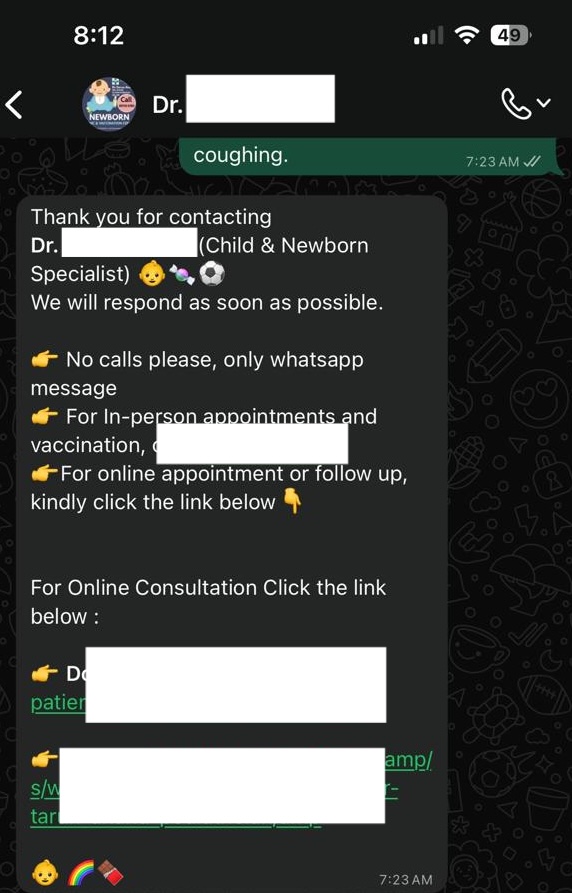
These are the basic automated responses triggered instantly after a message. For instance, when I contact my child’s pediatrician (who uses WhatsApp business), an automated reply always follows before he actually replies.
- Workflow Automation
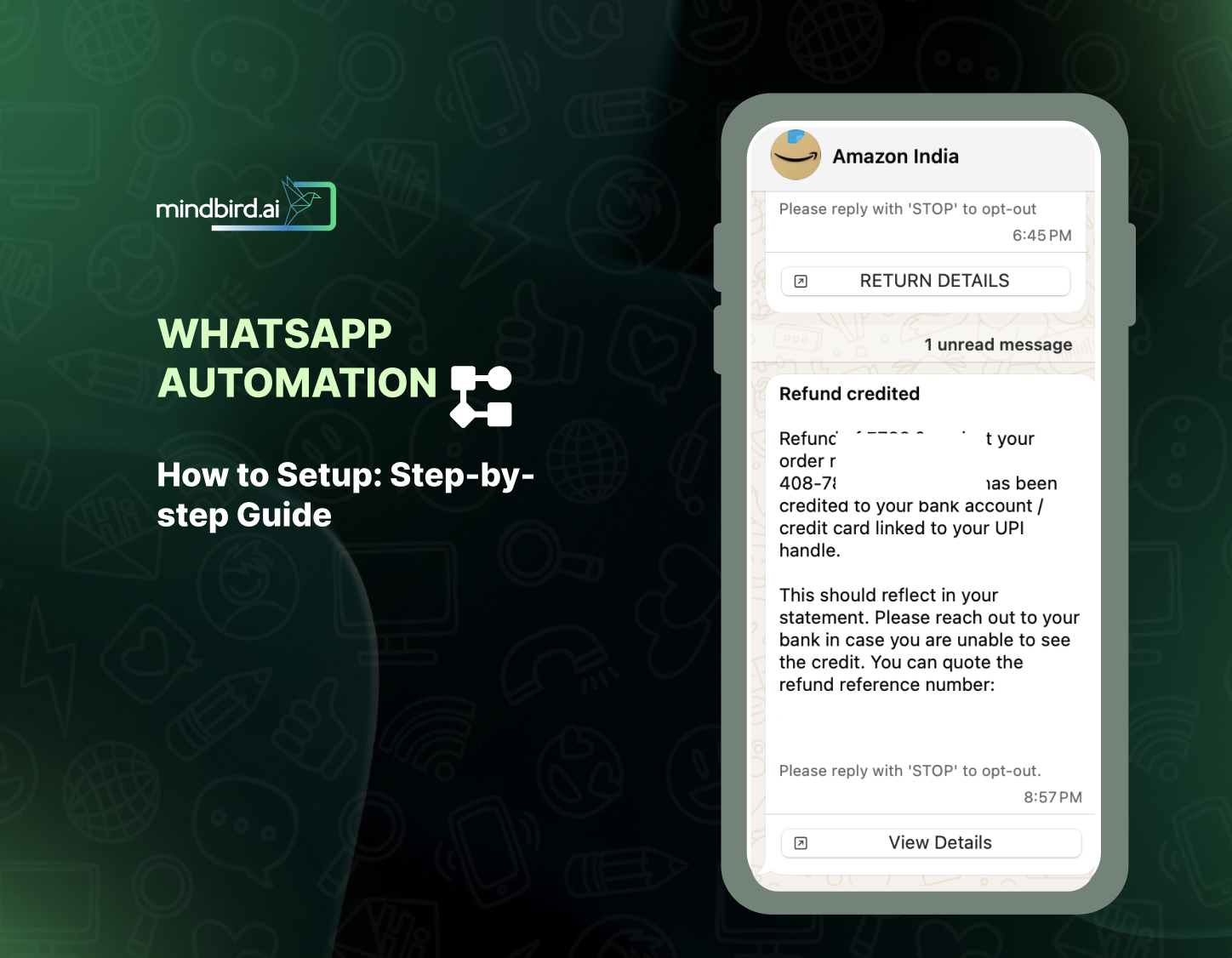
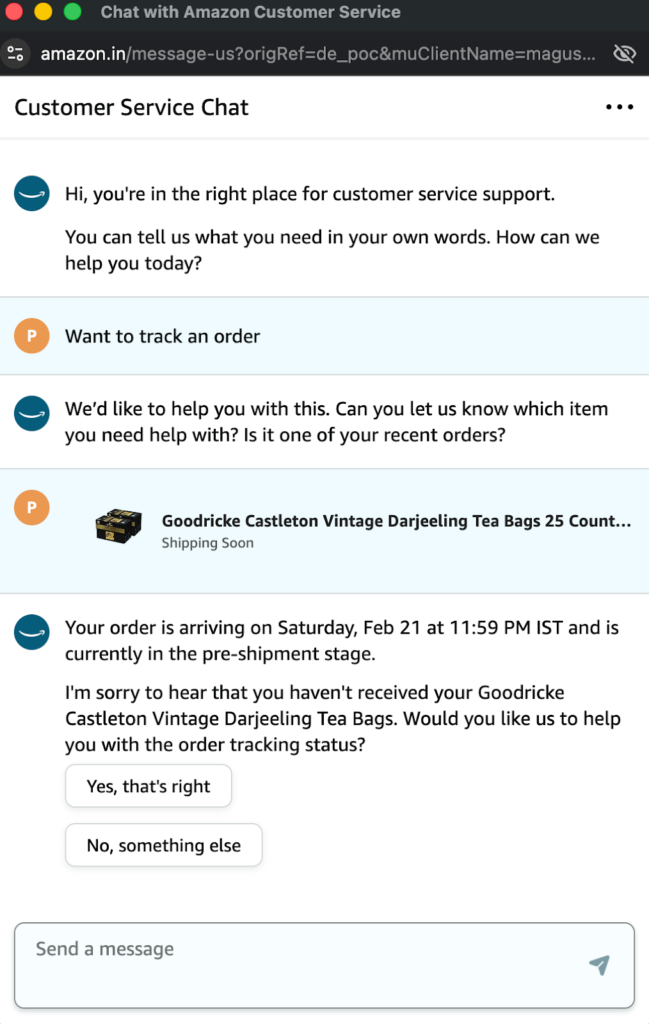
Workflow automation are structured conversations guiding a customer to a goal. For instance, Amazon’s chatbot helping with order details, delivery tracking, options to prepone delivery, discuss payment options, etc. It is instant, and has all the right options to select incase you want information of an order already placed.
- AI Conversational Automation
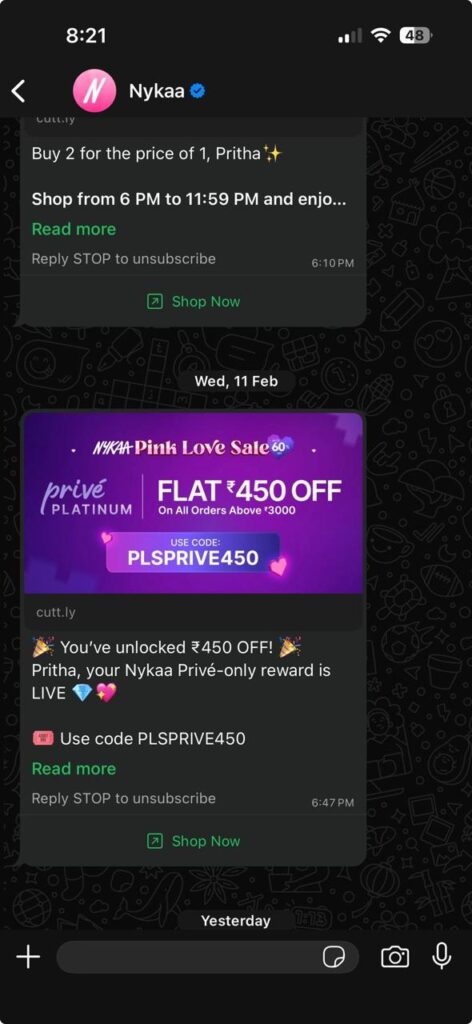
These are more natural conversation handling without fixed buttons, like sending out offers, updates, etc. You might already have such messages in your WhatsApp from brands that you frequent (or not) the most.
Here is an example of a conversational automated message from beauty and fashion brand, Nykka. If you notice, these are not promotional in nature (although the end goal is same) but are more personalized and tailored to user preferences.
- Trigger-Based Notifications
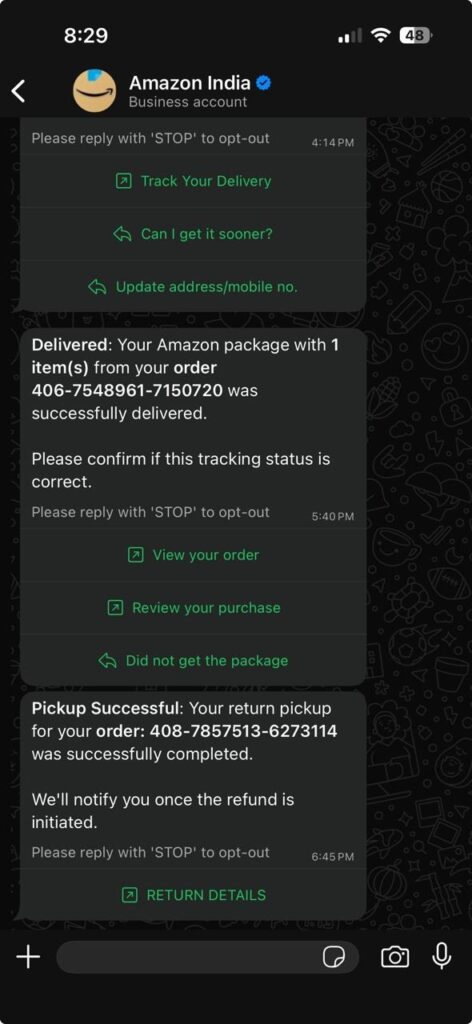
These are automated WhatsApp messages that are sent when triggered by a certain action from the end-user or calendar events. Delivery updates, EMI reminders, subscription auto-renewal alerts – all these are trigger-based notifications.
EMI and auto-renewal reminders are calendar-events that are automatically triggered to ensure end users pay them on time. Similarly, for eCommerce brands, updates on orders placed or cancelled are triggered when the end user either makes a purchase or cancels an order.
Delivery status is automatically shared when their package is out for delivery, which are notifications triggered based on delivery partners’ updates. Best example here would be Amazon.
Now that you know what you can build, let’s prepare for actually setting it up.
Prerequisites Before Setting Up WhatsApp Automation
The starting point will be understanding the basic difference between WhatsApp Business App and WhatsApp business API.
The Business App works well for manual conversations but cannot scale beyond a single device or operator. The API enables automation, multiple agents, integrations, and high-volume messaging. Businesses planning systematic customer journeys must use the API.
Now that we have addressed the confusion, the next step is verification.
WhatsApp requires identity verification to prevent spam and impersonation. You’ll have to submit business details, documents, and display name approval via Meta Business Manager. Verification improves trust and increases messaging limits over time.
Also read: How to Get Blue Tick for Your WhatsApp Business?
The next step is to choose the right automation tool.
PS. We recommend mindbird because here we handle the verification, setting up, and all other backend requirements for you. You simply tell us your end-goal, and we will help you align your business messaging through WhatsApp automation (and so many other features).
Coming back to our topic, here are a few mandates for choosing the automation tool.
CRM Integration
The platform should sync customer data automatically so conversations become trackable leads rather than isolated chats. Without this, sales teams lose context and follow-ups become manual.
No-Code Flow Builder
A visual builder allows marketing and operations teams to update flows without developers. This makes experimentation faster and keeps automation aligned with changing campaigns.
AI Capabilities
Look for intent recognition and fallback understanding. AI reduces rigid button-only experiences and allows users to type naturally, improving completion rates.
Analytics Dashboard
You need visibility into drop-offs, conversions, and response performance. Without analytics, optimization becomes guesswork.
After choosing the right tool, the real implementation begins.
How to Set Up WhatsApp Automation: Step-by-Step Guide
With mindbird, all these steps can be cut short into one single step – Signup with mindbird and see everything sorted for you real quick.
Step 1: Create and Verify Meta Business Account
Create a Meta Business Manager account and submit legal business information. Verification confirms authenticity and unlocks API access. Ensure your business name matches public branding because this name will appear in customer chats and impacts trust significantly.
Step 2: Apply for WhatsApp Business API Access
Add a dedicated phone number and submit a display name for approval. WhatsApp reviews it to prevent impersonation. Once approved, your number receives messaging tiers that expand as you maintain good quality conversations.
Step 3: Connect to an Automation Platform
The platform links to WhatsApp using API credentials and webhooks. This connection allows incoming messages to trigger workflows. Testing is done in a sandbox environment so errors can be fixed before customers interact with the system.
Step 4: Create Message Templates
Templates are required for proactive communication. You submit structured messages such as reminders, confirmations, and promotions. Keep them clear and non-spammy to get faster approval and better engagement rates.
Step 5: Design Conversation Flows
Map the user journey step by step — greeting, questions, branching logic, and outcomes. Include fallback replies and human handover. Think of it as designing a guided experience rather than just answering queries.
Step 6: Integrate CRM or Database
Connect the automation platform with your CRM to store every interaction. Leads are automatically created and updated based on responses, enabling personalized follow-ups and sales tracking.
Step 7: Add AI/NLP for Smart Responses
Enable intent recognition so users can type naturally instead of clicking buttons. The system interprets questions and fetches the appropriate response, improving conversation comfort and reducing friction.
Step 8: Test Automation Scenarios
Simulate real conversations including incorrect inputs and repeated questions. Testing ensures users never hit dead ends and that handover works smoothly.
Step 9: Deploy & Monitor
Go live and continuously monitor quality ratings, block rates, and drop-offs. Optimization is ongoing; refine flows based on actual behavior.
While setting up WhatsApp automation, take caution to avoid common pitfalls like:
- Over-automation with no human option: Automating messages is one part of the story, but always remember a bot will not be able to solve everything. Although bots are now capable of handling complex user queries, removing the option to talk to a human completely in a WhatsApp automation workflow is a bad idea. Always have the workflow in place for your end users to navigate incase they want to talk to a human rep.
- Very long messages: Too long messages in WhatsApp won’t be read. You need to grab attention of your users in a few seconds (as low as 5 seconds). Keep it short and to-the-point.
- Ignoring opt-in consent: Make sure you are sending messages to users who have genuinely opted in to receive WhatsApp notifications or have approach your brand via WhatsApp and willingly shared their information. Users hate overbearing brands.
- Broadcasting to cold users: Send out broadcast messages to everyone, including your active users. Whoever told you broadcast messages are only for cold users is lying to you. Keep the engagement going on for all your users, active or not.
- Not analyzing performance: Don’t assume all your WhatsApp campaigns will fly high simply because WhatsApp is one of the most engaging instant messaging platform. Analyze responses, timings, and every other metric that matters.
Key metrics to measure:
- First response time
- Conversation completion rate
- Lead qualification rate
- Conversion rate
- Customer satisfaction
- Revenue generated
WhatsApp has already grown into a full conversational interface for businesses. Going forward, AI agents are now proactively starting conversations based on user behaviors, handling complex service requests, and integrating deeply with payments, logistics, and CRM systems. Users now complete entire journeys, from discovery to transaction, within WhatsApp – making conversational commerce a primary digital interaction model.
Conclusion: What this means for businesses?
WhatsApp automation is no longer optional infrastructure. It is now the default way customers interact with businesses. You need to be the brand that implements structured, intelligent conversations to respond faster, qualify better, and retain customers longer.
Pro tip: Start with simple workflows, learn from data, and gradually expand toward fully automated customer journeys.